Posts

CCR (Music Video)

  This is my CCR PowerPoint.

Music Video Project

Image
After several weeks of hard work, my music video is finally finished. After seeing the final product, I am very satisfied. I had lots of fun making this project, and my creativity really shone through while doing it, which made me happy. Filming was very fun, and I enjoyed going outside and getting to hang out by the pool. The cold water was refreshing since it was so hot outside. However, my favorite part of this project was definitely the editing portion. It was so satisfying to take all the footage I had and make it into a movie-like collage. There are some things I could have done better, though. I hope that in the future I can look through my footage more carefully to notice any mistakes, instead of just filming one take and then being done. Overall, I think I did a good job on this project and I am excited to finally share it with my teachers.

Editing - The Finishing Touches

Image
This was the day that I finally added in the last things I needed for the editing stage. There wasn't much left to do, since I already did most of the editing on Saturday. The first thing I needed to do was add text at the beginning of the video. This is the opening text that displays the song title and my name. I made sure the color matched the aquamarine color of the text at the very end of the video. Also, I had to adjust the transition speed so that the title and my name faded in and out at the same duration. Once I had gotten this step right, I moved on to a couple of final things. Firstly, I looked at the second scene in the video. This was the scene in which I am in the bathroom getting ready in the mirror. The scene was okay, but I thought it could look better with a unique filter on it. I added a cool pink filter to enhance the look, and to create more excitement as I prepare to go outside by the pool. Additionally, I went over to the final two clips and realized the sound...

Editing - Compiling Footage

Image
  Today, I began the final step in creating my music video: editing. I had been wondering what editing app I would use, but I found and downloaded a great app called InShot. It has all the features and tools necessary for the editing portion of the video. You can split each clip, add any music, add text, among many other things. First, I found all the clips I had on my phone from the filming portion and compiled them into the video. I then had to film two more short clips of a black screen for the very beginning and end, where text would be displayed. Probably the biggest step of this portion was timing the clips so that the video is not only the right length, but the lip-syncing parts match the song correctly. I had to split and slow down clips several times to get the timing just right. Thankfully, the app has a "speed" feature that allows you to slow down or speed up clips to a specified amount. The final shot was a bit tricky to edit, since I had to get it within 1:10 and...

Final Shots

Image
  Today was my second and final day of filming for my music video. Most of the filming was done yesterday, so not much was left to be done. I made sure that my exact outfit from yesterday was still stored so I could wear it again for filming today. Once I put that shirt and bathing suit on again, I gathered the props I needed: sunglasses and a towel. Since the scene of me walking outside to the pool wasn't filmed correctly, I needed to reshoot it. I had my mom record me as I acted out the scene again. However, when I looked through it again, I noticed it hadn't been recording. The camera app on my phone wasn't working properly, so my mom used her phone so she could send it to me afterwards. Then, we recorded the scene, and she sent it to me once I was happy with it. I saved it to my camera roll and edited it so that it would look smoother. After this, I quickly looked through my footage from yesterday to see if anything else needed to be reshot. I was satisfied with the foo...

First Day of Filming

Image
  Today, I began the production process for my "Feels" music video. Before filming, I had to gather all props and equipment needed and make sure they were all in place. I also had to change into the shirt and bathing suit that I wanted to wear for the video. Then, I had my older sister help by filming the scenes. First, I went into the bathroom to film the first scene in front of the mirror. I then went out to the backyard pool deck, where my sister filmed me walking out. We filmed some shots of the pool area itself, as well as the planned close-up shot of me pouring Sprite into a solo cup. Next, I lye down on one an outdoor chair and my sister stood in front of me to film the next shot. This part was tricky, since I needed to lip-sync one of the lyrics from the song, even though it wasn't playing. I will have to manage this during the editing stage. Next, after a quick panning shot showing the pool, my sister filmed me diving into the pool and resurfacing. The water was ...

Storyboard for Music Video

Image
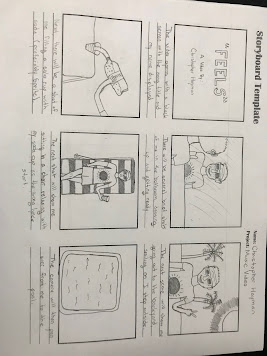
  Scene 1 - The screen will be black, with the song title, "Feels," fading in, along with text under it will read "A Video by Christopher Hayman. The text will then fade out. Scene 2 - There will be several brief  close-up shots of me in the bathroom, getting ready to go out to the pool. These shots will include my bathing suit, me putting on sunglasses, and wearing a sunny/beach-themed t-shirt. Scene 3 - The scene will cut to the pool deck as the music suddenly gets more energetic. This will be a tracking shot me stepping outside and smiling, and it will show various parts of my backyard. Scene 4 - In the next shot, there will be an extreme close-up shot of me pouring Sprite into a solo cup on a table outside. Then, I will grab the cup and take it away. Scene 5 - As the song lyrics begin, it will cut to me sitting on a poolside chair, holding my soda cup and mouthing the lyrics. This is going to be a high-angle shot. Scene 6 - Next, the camera will pan over to the pool,...